
Introduction
There's a moment when an AI video crosses a threshold and stops looking like AI. The lighting has depth, the camera moves like a real operator is behind it, the lens breathes, the color palette feels intentional. Suddenly it doesn't look like a generated clip — it looks like a shot from a film.
Getting there consistently is the hard part. Cinematic quality isn't just resolution. It's a stack of things working together: proper optical physics, deliberate camera language, film-grade color, atmospheric lighting, and enough temporal stability that the illusion holds for more than a few frames. Some AI platforms treat this as a core competency and build tools specifically for it. Others produce cinematic output as a byproduct of strong base models. And some prioritize speed and volume over visual craft entirely.
This roundup looks at ten AI video generator platforms specifically through the cinematic-quality lens: which ones actually produce footage that stands up to real production standards.
How We Test
Cinematic quality is more than resolution — it's a combination of technical and artistic factors. We evaluated each tool on:
- Resolution and detail — native 4K support and fine detail rendering
- Camera control — lens choice, movement, and multi-axis operation
- Lighting and mood — atmospheric lighting, shadow depth, color grading
- Optical physics — depth of field, lens flare, motion blur realism
- Model strength — access to top-tier cinematic engines
- Consistency — cinematic look preserved across shots and durations
TL;DR
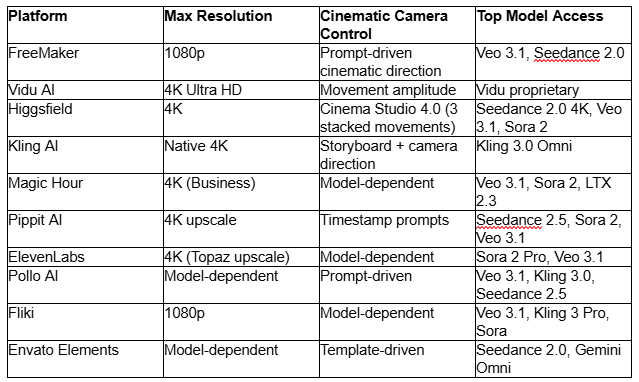
Website List
1. FreeMaker
What is it?
FreeMaker is a browser-based AI creative suite covering video, image, music, and voice generation in a single workspace. For cinematic quality, its access to Veo 3.1 and Seedance 2.0 alongside cross-shot consistency features gives you cinematic output with narrative-grade continuity — the kind of visual craft that survives from shot to shot rather than dying at the first cut.
Features
FreeMaker's cinematic strength runs through model access and consistency features. Veo 3.1 handles atmospheric cinematic scenes with strong native audio and lighting, and Seedance 2.0 brings cinematic camera work with 4K-quality output. Cross-shot character and object consistency preserves the cinematic look across multiple cuts — one of the harder problems in AI cinematography, where individual shots can look great but the sequence falls apart.
Physics simulation keeps fabric, hair, and lighting behaving naturally, which is a big part of what makes a shot read as cinematic rather than synthetic. Prompts up to 2,000 characters let you write detailed cinematic direction — lens choice, lighting mood, camera movement, atmospheric conditions — in a single instruction. The ai video extender is useful when a cinematic shot lands well and you want to extend without gambling on regeneration.
Pricing
- Free trial: up to 60 credits over 7 daily check-ins, no card required
- Lite: $14.9/mo — 300 credits, 720p
- Pro: $29.9/mo — 600 credits, 1080p
- Premium: $149.9/mo — 3,200 credits, 1080p, priority support
Annual pricing available. All paid plans include commercial rights and watermark-free exports.
Pros & Cons
Veo 3.1 and Seedance 2.0 for cinematic base quality
Cross-shot consistency preserves cinematic look across cuts
Physics simulation makes shots feel real rather than synthetic
1080p output cap on standard plans
No dedicated cinematic camera-control layer
Best for
Narrative creators, indie filmmakers, and premium marketers who need cinematic quality that holds across a full sequence, not just a single hero shot.
2. Vidu AI
What is it?
Vidu AI is a video generation platform powered by its own Vidu model, focused on semantic accuracy and multi-entity consistency. For cinematic quality, its 4K Ultra HD upscaling combined with strong subject rendering makes it a solid choice for polished narrative and product cinematography.
Features
Vidu's cinematic value comes from a combination of its proprietary model and 4K Ultra HD upscaling available on higher tiers. The model handles semantic detail well — meaning cinematic scene descriptions translate faithfully into rendered output rather than getting simplified or generalized. Movement amplitude control lets you dial down excessive motion, which is important for cinematic pacing where restraint often reads more professional than kinetic energy.
Reference to Video with multi-subject consistency preserves cinematic identity across shots — the same characters, the same props, the same lighting language survives from clip to clip. Duration extends to 3–16 seconds on paid plans, and up to 4 videos per generation lets you compare cinematic takes side by side. Batch generation is genuinely useful for cinematic work where you might need to iterate on the same shot to find the right feel.
Pricing
- Free: 40 credits/mo, 720p, 10 references/mo, no commercial license
- Standard: $10/mo or $8/mo annual ($96/yr) — 800 credits (~200 videos), 50 references, commercial rights
- Premium: $35/mo or $28/mo annual ($336/yr) — 4000 credits (~1000 videos), 1080p, 100 references
- Ultimate: $99/mo or $79/mo annual ($948/yr) — 8000 credits, 300 references, Ultra-fast channel
Pros & Cons
4K Ultra HD upscaling on higher tiers
Movement amplitude control for cinematic pacing
Semantic accuracy translates detailed cinematic prompts faithfully
Free plan doesn't allow commercial use
4K only unlocks at higher subscription tiers
Best for
Narrative and product creators who want polished cinematic output with strong subject rendering and controlled motion.
3. Higgsfield
What is it?
Higgsfield positions itself as a Universal AI Cinema Studio, and cinematic quality is the entire premise. Cinema Studio 4.0 layers real optical physics, camera-body simulation, and multi-axis movement over the strongest cinematic video models available, making it the most complete cinematic-first platform on this list.
Features
Cinema Studio 4.0 is Higgsfield's differentiator. It simulates real camera bodies and lenses — meaning depth of field, lens breathing, bokeh, and optical distortion all behave like they would on physical glass. Up to three stacked simultaneous camera movements let you combine a dolly, a crane, and a rack focus in a single shot, which is how real cinematography actually looks.
Model access covers the strongest cinematic engines: Seedance 2.5 and 2.0 4K (with 4K native output and synced audio), Kling 3.0, FLUX.3 Video, Sora 2, Veo 3.1, and MiniMax H3. Relight adjusts lighting and mood in-scene without regenerating, which is genuinely useful for matching cinematic looks across shots. Character locking preserves faces and identity through complex camera moves, and first-and-last frame reference lets you plan cinematic transitions between clips.
Pricing
- Starter: $19/mo (annual) — 270 credits/mo, up to 2 parallel videos
- Plus: $47/mo (annual, was $59) — 1,200 credits/mo, full Seedance access, unlimited paid parallel generations
- Ultra: $99/mo (annual, was $129) — 3,000 credits/mo, unlimited 2K generations for premium models
Pros & Cons
Real optical physics with lens and camera body simulation
Up to 3 stacked simultaneous camera movements
Relight for matching cinematic looks across shots
Starter tier locks out Seedance 2.5
Credit consumption climbs quickly on premium cinematic work
Best for
Filmmakers, ad directors, and premium content creators producing cinematic sequences where camera language and optical realism matter.
4. Kling AI
What is it?
Kling AI is a next-generation video and image generator built on the Kling 3.0 and 3.0 Omni model series, with native 4K output. For cinematic quality, Kling's strength lies in the underlying model — 3.0 Omni renders detail, lighting, and motion at a level that stands up to close inspection.
Features
Kling 3.0 Omni is a genuinely strong cinematic base model. Native 4K output preserves detail through hair, fabric, and skin — the kind of resolution that makes a shot feel finished rather than generated. Storyboard control up to 15 seconds lets you script cinematic sequences with per-shot direction of framing, camera angle, and specific events.
Elements 3.0 locks characters and objects for consistent cinematic identity across shots, and voice-driven characters with native lip-sync handle dialogue-heavy cinematic scenes. Multi-subject locking preserves ensemble shots, which matters for cinematic work with multiple actors in frame. Kling accepts up to 7 reference images or a 3–10 second video as visual input, useful for matching a specific cinematic aesthetic.
Pricing
- Basic (Free): watermarked exports
- Standard: $8.80/mo ($6.99 first month) — 660 credits, 1080p/4K, commercial rights
- Pro: $32.56/mo ($25.99 first month) — 3,000 credits, up to 50 custom elements
- Premier: $80.96/mo ($64.99 first month) — 8,000 credits, up to 150 custom elements
- Ultra: $159.99/mo ($127.99 first month) — 26,000 credits, up to 500 custom elements
Pros & Cons
Native 4K rendering on the base model, not upscaled
Strong detail on faces, hair, and fabric
Multi-subject locking for ensemble cinematic shots
No dedicated cinematic camera-control layer
Omni credits deplete quickly on longer clips
Best for
Narrative filmmakers and premium commercial creators who want the strongest single cinematic base model on the market.
5. Magic Hour AI
What is it?
Magic Hour is a unified AI creative studio combining video generation, image creation, and editing tools. For cinematic quality, its multi-model access is the practical draw — you can pick the strongest cinematic engine for each shot and chain upscaling and extension in a single workflow.
Features
Magic Hour gives access to Veo 3.1, Sora 2, Kling 2.5 and 3.0, LTX 2.3, Wan 2.2, and Seedance 2.0. For cinematic work, Sora 2 handles up to 60 seconds of coherent storytelling with atmospheric depth, Veo 3.1 delivers photorealistic environments, and LTX 2.3 brings expressive character rendering that reads as filmic rather than synthetic. Business-tier 4K export finishes the pipeline at cinema-grade resolution.
The AI Video Extender preserves cinematic continuity when lengthening a shot — genuinely useful when a take feels right and you want more of it rather than a re-roll. Multi-step workflows chain generation, upscaling, and extension in a single flow. Developer REST API (Python, Node.js, Go, Rust SDKs) supports programmatic cinematic pipelines for production teams.
Pricing
- Free: 3 generations/day, 3s clips, 480p, watermark
- Creator: $19/mo or $12/mo annual ($144/yr) — 144K credits/yr, 1024px, commercial rights
- Pro: $39/mo or $25/mo annual ($300/yr) — 300K credits/yr, 1472px, 5 concurrent generations
- Business: $99/mo or $66/mo annual ($792/yr) — 840K credits/yr, 4K exports
Unused credits roll over indefinitely.
Pros & Cons
Multi-model access covers most cinematic use cases
4K export on Business tier
Workflow chaining from generation to finished export
4K locked to Business tier
No dedicated cinematic camera-control layer
Best for
Creators and production teams who want model flexibility for different cinematic scenarios and programmatic pipeline support.
6. Pippit AI
What is it?
Pippit AI is a CapCut-powered creative agent designed to automate content production. For cinematic quality, its 30-second continuous takes on Seedance 2.5 with timestamp video prompts give you sustained cinematic sequences rather than the usual 5-8 second clips.
Features
Pippit's cinematic advantage is duration. Seedance 2.5 integration supports 30-second continuous takes with timestamp video prompts — you can direct camera movement, lighting shifts, and action beats at specific moments within a single sustained shot. That's a fundamentally more cinematic way to work than stitching many short clips.
Model access spans Seedance 2.5, Sora 2, Veo 3.1, and Nano Banana Pro, each strong for different cinematic scenarios. 4K upscaling on paid plans finishes the pipeline at high resolution. Digital avatars and AI Talking Photos work for dialogue-heavy cinematic scenes, and multimodal style references keep visual aesthetics locked across a sequence. Story Studio maintains cinematic narrative flow through long-form content.
Pricing
- Free: no credit card, daily free credits, 3 free photo avatars
- Starter: $200/yr regular ($120/yr on sale) — 2,100 credits/mo, watermark removal, 4K upscaling
- Plus: $600/yr regular ($360/yr on sale) — 6,700 credits/mo, faster generation, 3 customized video avatars
- Pro: $3,000/yr regular ($1,800/yr on sale) — 35,500 credits/mo, fastest generation, 10 video avatars
Pros & Cons
30-second continuous takes for sustained cinematic sequences
Timestamp prompts for shot-level cinematic direction
4K upscaling on paid plans
Only annual pricing displayed
Pro tier is a serious commitment
Best for
Creators producing long-form cinematic content or sustained narrative sequences where a single continuous take reads more cinematic than many cuts.
7. ElevenLabs
What is it?
ElevenLabs is a full creative suite built around voice AI, with expanding video, music, and sound effects tools. For cinematic quality, its combination of top-tier video model access, Topaz 4K upscaling, and Studio 3.0 timeline gives you a genuinely cinematic finishing pipeline.
Features
ElevenLabs provides access to Sora 2 Pro, Veo 3.1, Kling 2.5/3.0, Wan 2.5, and Seedance 1.5/2.5 — collectively covering the strongest cinematic engines. Topaz upscaling to 4K is a real cinematic finishing touch, cleaning up detail and grain in a way that makes a shot feel polished rather than generated. Studio 3.0's multi-track timeline lets you compose cinematic sequences with synchronized voice, music, and sound design — an area where cinematic quality often falls apart in AI workflows.
Voice cloning and 5,000+ voices across 32+ languages preserve character voices across cinematic sequences. Scribe (their speech-to-text model) generates captions that carry through complex scenes. The whole pipeline is designed for creators who want cinematic polish across picture and sound together, not just video in isolation.
Pricing
- Free: 10K credits/mo, no video generation
- Starter: $6/mo ($5/mo annual) — 30K credits, ~211s video, 720p, Instant Voice Cloning
- Creator: $22/mo ($18.33 annual) — 121K credits, ~705s video, 1080p, all models unlocked
- Pro: $99/mo ($82.50 annual) — 600K credits, ~3,525s video, 4K upscaling
- Scale / Business / Enterprise: $299+ with team features
Paid plans get 2-month credit rollover.
Pros & Cons
Topaz 4K upscaling for cinematic finishing
Studio 3.0 timeline for picture-and-sound cinematic composition
Access to Sora 2 Pro, Veo 3.1, and other top engines
Free plan blocks video generation entirely
4K upscaling locked to Pro tier and above
Best for
Cinematic creators who care about audio polish as much as visual — narrative shorts, documentaries, character-driven work where sound and picture finish together.
8. Pollo AI
What is it?
Pollo AI is a multi-model creative platform that consolidates industry-leading video engines under one interface. For cinematic quality, its access to the top engines combined with a prompt-driven editor for cinematic refinements makes it a flexible finishing tool.
Features
Pollo AI provides access to Pollo 2.5, Wan 3.0, Seedance 2.5, MiniMax H3, Veo 3.1, and Kling 3.0 — all strong for different cinematic scenarios. The prompt-driven video editor is the cinematic finishing tool: you can adjust lighting, atmosphere, weather, camera framing, and mood via text commands without re-generating from scratch. That's genuinely useful for cinematic work where a shot is 90% right and needs a specific tweak.
Reference to Video AI accepts up to three reference images, useful for matching a specific cinematic aesthetic across shots. Extended video length up to 60 seconds on paid plans supports longer cinematic sequences, and the URL to Video Ads tool auto-generates cinematic product ads from a source page.
Pricing
- Free: limited sign-up credits, 3–5s video-to-video length cap
- Lite / Pro / Pro-Yearly: watermark-free, high-priority processing, extended video length (3–60s), up to 60% off select premium models
Add-on credits don't expire and remain after subscription ends. Refund window is 3 days from first purchase.
Pros & Cons
Multi-model access to top cinematic engines
Prompt-driven editor for cinematic refinements without re-rolling
Extended 60-second duration on paid plans
No dedicated cinematic camera-control layer
Reference limit of 3 images
Best for
Creators who want model flexibility and prompt-driven cinematic refinements for social, commercial, and short-form cinematic work.
9. Fliki
What is it?
Fliki is an all-in-one AI content creation suite built around script-to-video and long-form workflows. For cinematic quality, its access to Veo 3.1, Kling 3 Pro, and Sora combined with a full timeline editor gives you cinematic output within a structured content pipeline.
Features
Fliki's cinematic value comes from combining strong model access — Veo 3.1, Kling 3 Pro, Sora, Seedance 2, LTX-2, PixVerse v5, and Flux — with a script-to-video pipeline that structures long-form cinematic content. Blog-to-video and URL-to-video automatically break long-form text into cinematic shot sequences, matching visuals, voiceover, and captions. The timeline editor then lets you refine each shot with cinematic intent.
Custom brand kits keep typography, colors, and style consistent across every shot, which matters for cinematic aesthetic coherence. Automatic subtitle generation across 100+ languages carries through the sequence. The 2,000+ voices in 80+ languages support cinematic narration and character work.
Pricing
- Free: 3 credits/mo (5 min), 1-min max, watermark
- Standard: $28/mo or $21/mo yearly — 2,160 credits/yr, 15-min max, 1080p, 1 voice clone
- Premium: $88/mo or $66/mo yearly — 7,200 credits/yr, 40-min max, AI avatars, 3 voice clones, custom fonts, API
- Enterprise: Custom
Pros & Cons
Strong cinematic model access within a structured pipeline
Timeline editor for shot-by-shot cinematic refinement
Brand kits keep cinematic aesthetics consistent
1080p output cap
Less focus on AI-native cinematic camera control
Best for
Content creators, marketers, and educators producing structured cinematic content from scripts or articles.
10. Envato Elements
What is it?
Envato Elements is a creative asset subscription platform covering 29M+ stock assets alongside a suite of AI generators. For cinematic quality, its combination of professional stock footage, editable templates, and AI generators gives you a hybrid cinematic pipeline — real cinematography plus AI generation where needed.
Features
Envato's cinematic value is the stock library. 29M+ assets include professionally shot 4K cinematic footage — the kind of B-roll, establishing shots, and atmospheric coverage that would take a real crew to capture. Editable premium templates for openers, logo stings, broadcast packages, and cinematic ads give you pre-composited cinematic structures.
AI generators (Flux 3, Nano Banana 2, Seedance 2.0, Gemini Omni, ElevenLabs) fill in the gaps where stock doesn't cover the specific shot you need. Lifetime commercial license covers both stock and AI-generated assets, which matters for cinematic marketing where rights clarity is important. Deep font libraries handle cinematic typography for titles and end cards.
Pricing
- Core: $16.50/mo annual ($39/mo monthly) — 20 AI credits/mo, unlimited downloads
- Plus: $39/mo annual ($59/mo monthly) — 200 AI credits/mo, 3 parallel generations
- Ultimate: $168/mo annual ($259/mo monthly) — 500/1,000/2,000 credits/mo (slider), 10 parallel generations
- Enterprise: Custom
Pros & Cons
Massive library of professionally shot cinematic stock footage
Pre-composited cinematic templates
Lifetime commercial license on everything
Not AI-native for cinematic generation
AI credit allocations are modest on lower tiers
Best for
Marketing teams and content creators producing cinematic-quality output through a hybrid stock-and-AI pipeline.
Key Takeaways
A few patterns emerge when you look specifically at cinematic quality:
For camera control and optical realism, Higgsfield's Cinema Studio 4.0 is in a class by itself — real lens simulation and stacked camera movements are unique on this list.
For base model strength, Kling AI's native 4K Omni model produces the highest-quality single shots, and Vidu's 4K Ultra HD upscaling delivers strong finished output.
For cinematic consistency across shots, FreeMaker's cross-shot locking and Kling's Elements 3.0 preserve the cinematic look through sequences rather than just individual clips.
For sustained cinematic takes, Pippit AI's 30-second Seedance 2.5 shots and Magic Hour's 60-second Sora 2 support reduce the need for cinematic-continuity gymnastics across many cuts.
For cinematic finishing including audio, ElevenLabs' Topaz 4K upscaling plus Studio 3.0 timeline gives you the most complete polish pipeline.
Conclusion
Cinematic quality in AI video has moved from "sometimes lucky" to "reliably achievable" in the past year. Purpose-built tools like Higgsfield's Cinema Studio 4.0 have introduced real optical physics to generated video, and base models like Kling 3.0 Omni, Veo 3.1, and Sora 2 have raised the floor on what a single shot can look like. The pieces are all here now: 4K resolution, lens simulation, atmospheric lighting, character consistency, and audio-picture finishing.
The right platform depends on your cinematic priorities. For pure optical realism and camera language, Higgsfield leads. For the strongest single cinematic base model, Kling AI. For narrative consistency across multi-shot cinematic sequences, FreeMaker. For sustained cinematic takes, Pippit AI. For picture-and-sound finishing together, ElevenLabs. Start with the platform that solves your biggest cinematic bottleneck first — then layer in the others as your ambition grows.